
Hex editing
Read and edit bytes in hex and text views. Cached loading supports large files without loading the entire file into memory.
Inspect files, disks and process memory. Automate analysis with Python.
Analyze binary files, disks and process memory with JoHex. Use embedded Python 3.10, memory scanning, AI assistance and deleted-file recovery on Windows.
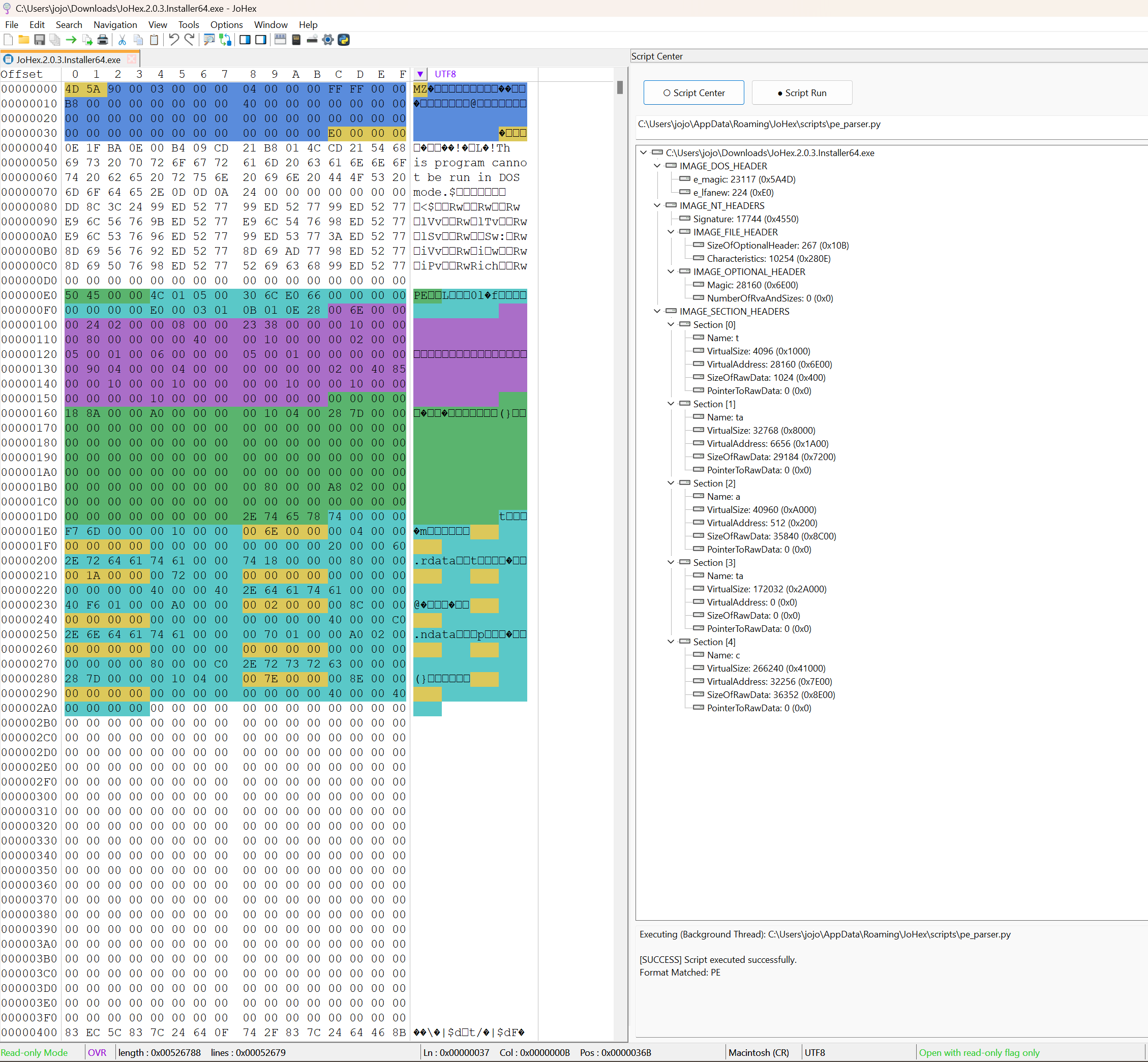
Python analysis
Analyze binary files, disks and process memory with JoHex. Use embedded Python 3.10, memory scanning, AI assistance and deleted-file recovery on Windows.
Read and edit bytes in hex and text views. Cached loading supports large files without loading the entire file into memory.
Search the contents of large binary files and inspect matching offsets and surrounding data.
Read, write and analyze process memory for analysis and debugging, subject to access permissions.
Read, write and analyze disk data. Review changes carefully because direct writes can affect the filesystem.
Run dozens of built-in analysis scripts with embedded Python 3.10, use one-click analysis and visualize file structures. Configure module restrictions such as process and network.
Use memory scanning to locate data for program analysis and debugging, then inspect the results in context.
Configure an endpoint URL, API key and model name in Settings. Send selected editor content with client-added analysis context to an OpenAI Chat-compatible service.
Find and recover deleted files by analyzing residual filesystem data. Recovery depends on what remains and is not guaranteed.
Official scripts receive a green shield after signature verification. Scripts from a user-defined directory receive a yellow shield to identify their source. These badges distinguish provenance; they do not guarantee that every script operation is harmless.
Choose the right data source, inspect the results and save deliberate changes.
Inspect file contents, offsets and unexpected bytes while investigating a format or application problem.
Compare patterns in files, inspect memory and examine disk data within the access permissions available to you.
Run built-in analysis scripts with embedded Python 3.10, use one-click analysis and visualize file structures. Configure module restrictions such as process and network.
| Platforms | Windows |
|---|---|
| Data sources | Files, process memory and raw disk data |
| Scripting | Python 3.10 |
| Language | Interface language can be selected in settings |
| License | See current pricing and edition details |
You can disable selected modules, for example process and network, to prevent them from loading. This setting is not a guarantee of a fully isolated sandbox.
A green shield marks an official script whose signature passed verification. A yellow shield identifies a script from your custom directory, rather than a malicious-script verdict.
You configure the endpoint URL, API key and model name in Settings. JoHex sends the editor content you select and adds analysis context, such as the current file-analysis task.
No. JoHex analyzes residual filesystem data. Recovery depends on the remaining information, and no success rate is guaranteed.
JoHex uses cached loading rather than keeping an entire large file in RAM. This helps control memory use and stalls; actual responsiveness depends on storage and the operation.
Review the available edition and download options before installing.